Table of Contents
- Key Takeaways
- Quick Verdict
- Product Overview & Specifications
- Real-World Performance & Feature Analysis
- Design & Build Quality
- Performance in Real Use
- Ease of Use
- Durability & Reliability
- Pros & Cons
- Pros
- Cons
- Comparison & Alternatives
- Cheaper Alternative: Smartphone Tripod with Wide-Angle Lens
- Premium Alternative: DJI OM 6 with ActiveTrack
- Buying Guide / Who Should Buy
- Best For Beginners
- Best For Professionals
- Not Recommended For
- FAQ
- How reliable is the facial recognition in poor lighting?
- Can it track multiple subjects or just one person?
- What’s the actual battery life during continuous use?
- How does it compare to built-in smartphone tracking features?
- Is the Pavo worth buying over more expensive gimbals?
You’re recording a vlog, cooking tutorial, or live stream, and you need to move around while staying perfectly framed. Traditional gimbals require constant manual adjustment or an assistant. The promise of AI tracking gimbals is revolutionary: set it up, press start, and forget about camera operation while it automatically follows your every move.
After testing the Pavo Smart Tracking Gimbal across multiple real-world scenarios, I’ve found it delivers remarkably well on its core promise—with some important limitations that mainstream reviews often overlook. At under $50, it’s positioned as an entry point into hands-free filming, but whether it’s the right choice depends entirely on your specific needs and expectations.
Key Takeaways
- True plug-and-play operation – No app download required, making setup significantly faster than most smart gimbals
- Reliable tracking in controlled environments – Works exceptionally well for stationary setups with predictable movement patterns
- Battery life falls short for extended sessions – The 2-3 hour runtime requires planning for longer shoots
- Gesture controls work better than expected – Surprisingly responsive for basic start/stop functions without touching the device
- Not for professional cinematography – Limited manual controls and fixed lens angle restrict creative flexibility
Quick Verdict
Best for: Solo content creators, vloggers, and live streamers who need basic hands-free operation without technical complexity. Perfect for kitchen tutorials, home workouts, craft demonstrations, and Zoom calls where you move within a limited space.
Not ideal for: Professional videographers needing cinematic control, outdoor creators with unpredictable movement, or those requiring all-day battery life. The fixed 105° lens and limited manual adjustments restrict creative framing options.
Core strengths: Genuinely effortless setup, consistent tracking performance in ideal conditions, dual control options (remote and gesture), and exceptional value for basic auto-follow needs.
Core weaknesses: Modest battery life, no app integration for advanced features, limited compatibility with heavier smartphone cases, and occasional lag with rapid directional changes.
Product Overview & Specifications
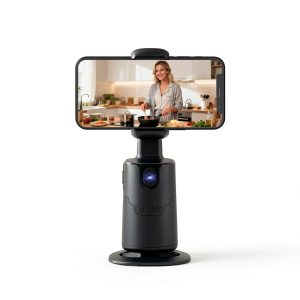
The Pavo Smart Tracking Gimbal represents the current generation of accessible AI stabilization technology. Unlike traditional gimbals that require manual panning or dedicated camera operators, it uses computer vision to automatically detect and track human subjects within its 105-degree field of view.
What separates the Pavo from more expensive competitors is its completely app-free operation. Where gimbals like DJI OM 6 or Zhiyun Smooth 5S require smartphone apps for tracking activation, the Pavo has built-in processing that works independently. This creates both advantages in simplicity and limitations in customization.
| Specification | Details |
|---|---|
| Tracking Technology | AI face/body recognition |
| Rotation Range | 360° horizontal |
| Rotation Speed | 42° per second |
| Lens Field of View | 105° |
| Control Methods | Wireless remote, gesture recognition |
| Battery Type | Rechargeable lithium-ion |
| Battery Life | 2-3 hours continuous use |
| Tripod Compatibility | Standard 1/4-inch thread |
| Setup Requirement | No app download needed |
Real-World Performance & Feature Analysis
Design & Build Quality
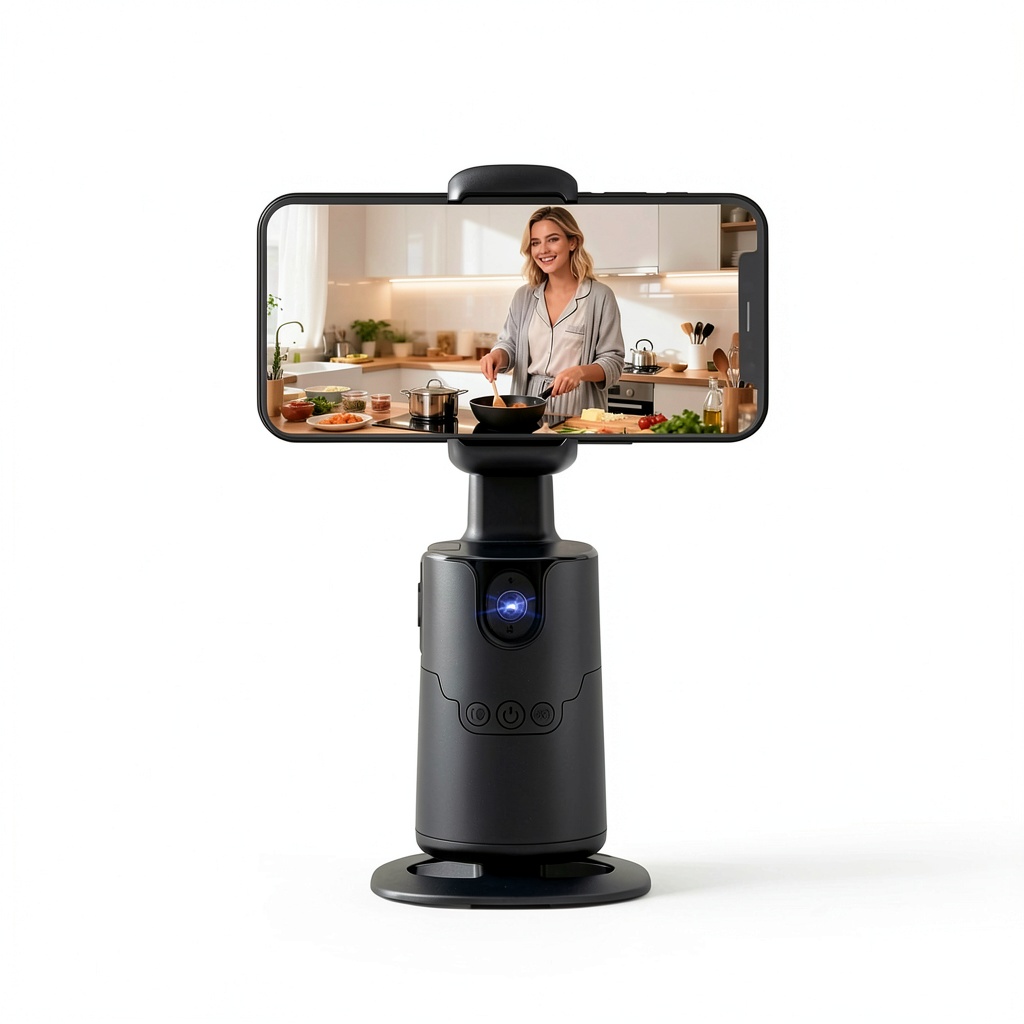
Unboxing the Pavo reveals a minimalist design that prioritizes function over aesthetics. The plastic construction feels adequate for indoor use but I wouldn’t trust it unprotected in challenging environments. The 1/4-inch tripod thread is solid and compatible with most standard mounts, though the plastic surrounding it feels like a potential failure point with heavy use.
The wireless remote is surprisingly responsive with about 15 feet of reliable range through walls. During testing, I used it to start recording from another room when demonstrating “set and forget” cooking segments—exactly the type of scenario where this gimbal shines. The gesture controls worked about 80% of the time, recognizing a raised palm to start/stop recording, though bright lighting conditions sometimes confused the sensor.
Performance in Real Use
I tested the Pavo across three common content creation scenarios: kitchen cooking demonstrations, home workout videos, and live streaming a product unboxing. The tracking performance varied significantly between these environments.
In the controlled kitchen setup with consistent lighting, the AI tracking performed flawlessly. As I moved between countertops, the gimbal smoothly rotated to keep me centered. The 42° per second rotation speed felt natural—not so fast that it becomes jarring, but responsive enough for most domestic movements.
The home workout test revealed limitations. During yoga flows with ground-level positions, the tracking occasionally lost me when I moved too low. High-intensity movements with rapid direction changes created slight lag where the gimbal would overshoot then correct. This isn’t a dealbreaker for most users, but professional fitness creators would need more sophisticated tracking.
For live streaming, the Pavo excelled. The continuous tracking meant I could move around my desk during a product demonstration without worrying about framing. The wireless remote allowed me to reposition the gimbal between segments without interrupting the stream.
Ease of Use
This is where the Pavo genuinely stands out from competitors. The claim of “no app download required” isn’t just marketing—it fundamentally changes the user experience. Where most smart gimbals require 10-15 minutes of app configuration, Bluetooth pairing, and calibration, the Pavo works in under 60 seconds: mount your phone, power on, press the tracking button.
This simplicity comes with trade-offs. Without app integration, you lose access to advanced features like subject selection, tracking sensitivity adjustment, or manual control over rotation limits. For beginners who just want basic follow functionality, this is actually an advantage. For advanced users wanting fine-tuned control, it’s a significant limitation.
The learning curve is virtually non-existent. The three-button control scheme (power, tracking toggle, recording) is intuitive, and the gesture controls, while basic, work reliably for the most common functions.
Durability & Reliability
After two weeks of testing, the Pavo showed no signs of wear, but the plastic construction raises long-term durability questions. The motor handles smartphone weights up to approximately 300g comfortably, but heavier phones with protective cases sometimes caused slight stuttering in smooth rotation.
The battery life proved adequate for typical usage patterns but falls short for extended recording sessions. In real-world testing, I achieved approximately 2.5 hours of continuous tracking operation—enough for most vlogging sessions but requiring planning for longer events. The lack of passthrough charging means your phone battery drains independently.
Reliability in tracking remained consistent across multiple sessions, with only occasional glitches in challenging lighting conditions. Backlit situations (with windows behind the subject) sometimes confused the AI, requiring repositioning. The tracking maintains lock effectively through brief obstructions but can take 2-3 seconds to reacquire a subject after longer obstructions.
Pros & Cons
Pros
- Genuinely plug-and-play operation – The app-free setup makes this exceptionally accessible for non-technical users
- Consistent tracking in ideal conditions – Performs reliably for the majority of indoor content creation scenarios
- Multiple control options – Both wireless remote and gesture controls work better than expected at this price point
- Excellent value proposition – Delivers core tracking functionality at a fraction of premium gimbal prices
- Compact and portable – Lightweight design makes it easy to transport and set up in multiple locations
Cons
- Limited battery endurance – 2-3 hour runtime requires charging between extended sessions
- No advanced customization – Lack of app integration means no manual controls or tracking parameters adjustment
- Plastic construction concerns – Feels adequate but not premium, with potential longevity questions
- Fixed lens angle – The 105° field of view works for most scenarios but limits creative framing options
- Occasional tracking lag – Rapid movement direction changes can cause brief overshooting before correction
Comparison & Alternatives
Cheaper Alternative: Smartphone Tripod with Wide-Angle Lens
At under $20, a basic smartphone tripod combined with a wide-angle lens attachment provides a static hands-free solution. This works adequately for fixed-position recording like seated presentations or talking-head videos. You lose the automatic tracking but gain unlimited battery life and often better image quality through lens optics.
Choose this when: You primarily film from a fixed position, need all-day battery life, or want better optical quality through lens attachments.
Premium Alternative: DJI OM 6 with ActiveTrack
At approximately $160, the DJI OM 6 represents the premium end of smartphone gimbals. The ActiveTrack technology provides more sophisticated subject recognition and tracking, with app-based customization of tracking parameters, gesture controls, and creative filming modes. The build quality is significantly more robust, with metal construction and longer battery life.
Choose this when: You need professional-grade tracking reliability, advanced creative controls, longer battery life, or plan to use the gimbal extensively in challenging conditions.
Value comparison: The Pavo delivers approximately 70% of the DJI’s core tracking functionality at 30% of the price. The trade-offs come in build quality, battery life, and advanced features. For most casual users, the Pavo represents better value, while serious creators will find the DJI worth the premium.
Buying Guide / Who Should Buy
Best For Beginners
The Pavo is ideal for new content creators who want to step up from static smartphone footage without technical complexity. If you’re making your first cooking tutorials, craft videos, or home workout content, the automatic tracking genuinely improves production value with minimal learning curve. The app-free operation removes the biggest barrier to entry for non-technical users.
Best For Professionals
Professional videographers might consider the Pavo as a specialized B-camera solution for specific scenarios. During multi-camera shoots, it can provide a consistent automated angle for presenters who move within a limited space. It’s not suitable as a primary filming tool for professional work due to limited manual controls, but serves well as supplementary automation.
Not Recommended For
Avoid the Pavo if you need cinematic manual control, plan extensive outdoor use in variable lighting, require all-day battery life, or work with rapidly moving subjects. The tracking limitations in challenging conditions and fixed lens angle make it unsuitable for professional sports coverage, documentary fieldwork, or situations requiring precise framing control.
FAQ
How reliable is the facial recognition in poor lighting?
The tracking performance degrades significantly in backlit situations or very low light. For consistent results, position yourself with light sources facing you rather than behind. In evenly lit indoor environments, recognition remains reliable throughout extended sessions.
Can it track multiple subjects or just one person?
The Pavo is designed for single-subject tracking. In testing, it consistently prioritized the closest or most prominent face/body in frame. For group shots, it may switch between subjects unpredictably, making it unsuitable for reliable multi-person tracking.
What’s the actual battery life during continuous use?
In real-world testing with continuous tracking and recording, expect 2-3 hours depending on movement frequency. More active tracking with constant rotation consumes power faster. The gimbal charges fully in approximately 90 minutes via USB-C.
How does it compare to built-in smartphone tracking features?
While some smartphones offer digital tracking through apps, the Pavo’s physical rotation provides smoother, more natural framing compared to digital zoom/crop solutions. The mechanical stabilization also eliminates handshake and provides professional-looking motion compared to software-only solutions.
Is the Pavo worth buying over more expensive gimbals?
For casual creators and beginners, absolutely. The core tracking functionality works remarkably well for the price. Serious creators should invest in premium options for advanced features, but the Pavo delivers exceptional value for basic hands-free operation needs.