Table of Contents
- Key Takeaways
- Quick Verdict
- Product Overview & Specifications
- Real-World Performance & Feature Analysis
- Design & Build Quality
- Performance in Real Use
- Ease of Use
- Durability & Reliability
- Pros & Cons
- Pros
- Cons
- Comparison & Alternatives
- Cheaper Alternative: Logitech C920s
- Premium Alternative: Insta360 Link (Original)
- Buying Guide / Who Should Buy
- Best for Beginners
- Best for Professionals
- Not Recommended For
- FAQ
- Does the auto-framing work with multiple people?
- How does it perform with backlit situations?
- Is the software required for basic use?
- How does it compare to using a smartphone as a webcam?
- Is the Insta360 Link 2C worth the price premium over basic webcams?
You’re on your fifth video call of the day, and your colleague just asked if you’re “still there” because you leaned out of frame to grab a document. Or maybe you’re trying to stream gameplay while maintaining eye contact with your audience, constantly adjusting your camera manually. These aren’t just minor annoyances—they’re productivity killers that make you look less professional.
After testing the Insta360 Link 2C 4K webcam across weeks of real meetings, streams, and creative work, I can tell you this isn’t just another webcam. The auto-framing technology genuinely changes how you approach video communication, but it’s not the right solution for everyone. The real question isn’t whether the tech is impressive (it is), but whether it solves problems you actually experience daily.
Key Takeaways
- The auto-framing works remarkably well for moving presentations and multi-person calls, but has limitations for strict stationary work
- Image quality significantly outperforms similarly priced webcams in low-light conditions thanks to the larger sensor
- Setup requires more consideration than typical plug-and-play webcams due to the AI features
- At under $100, it represents exceptional value for hybrid workers and content creators, but overkill for basic Zoom users
- The companion software adds meaningful customization, but introduces potential compatibility issues with some conferencing platforms
Quick Verdict
The Insta360 Link 2C delivers professional-grade auto-framing and image quality at a consumer-friendly price point, making it one of the most compelling webcam upgrades available today—if you actually need its specialized capabilities.
Best for: Hybrid workers who move during presentations, content creators needing hands-free framing, educators demonstrating physical objects, and budget-conscious streamers wanting professional features.
Not ideal for: Stationary users who rarely move from their desk, those needing absolute plug-and-play simplicity, or users in perfectly lit environments where basic webcams suffice.
Core strengths: Exceptional auto-framing intelligence, superior low-light performance for the price, versatile mounting options, and robust build quality that justifies the investment.
Core weaknesses: Software dependency for advanced features, occasional framing delays in fast movement scenarios, and potentially over-engineered for basic video call needs.
Product Overview & Specifications
The Insta360 Link 2C represents the accessible entry point into Insta360’s AI-powered webcam lineup, bringing the company’s signature auto-framing technology to a more budget-conscious audience. What makes this particularly interesting isn’t just the specs sheet, but how Insta360 has managed to retain the core intelligent features while hitting a price point that competes with conventional premium webcams.
Having tested both the original Link and this 2C model side-by-side, the cost-cutting measures are thoughtful rather than detrimental. You’re getting the same AI brain in a slightly different body, and for most users, the trade-offs make perfect sense.
| Specification | Details |
|---|---|
| Sensor Size | 1/2-inch CMOS |
| Maximum Resolution | 4K @ 30fps / 1080p @ 60fps |
| Field of View | Adjustable via auto-framing |
| Auto-Framing | Yes, with subject tracking |
| Mounting Options | Standard clip, tripod compatible |
| Microphone | Dual noise-canceling mics |
| Compatibility | USB-C, works with Zoom, Teams, Twitch, etc. |
| Software | Insta360 Link Controller (optional) |
Real-World Performance & Feature Analysis
Design & Build Quality
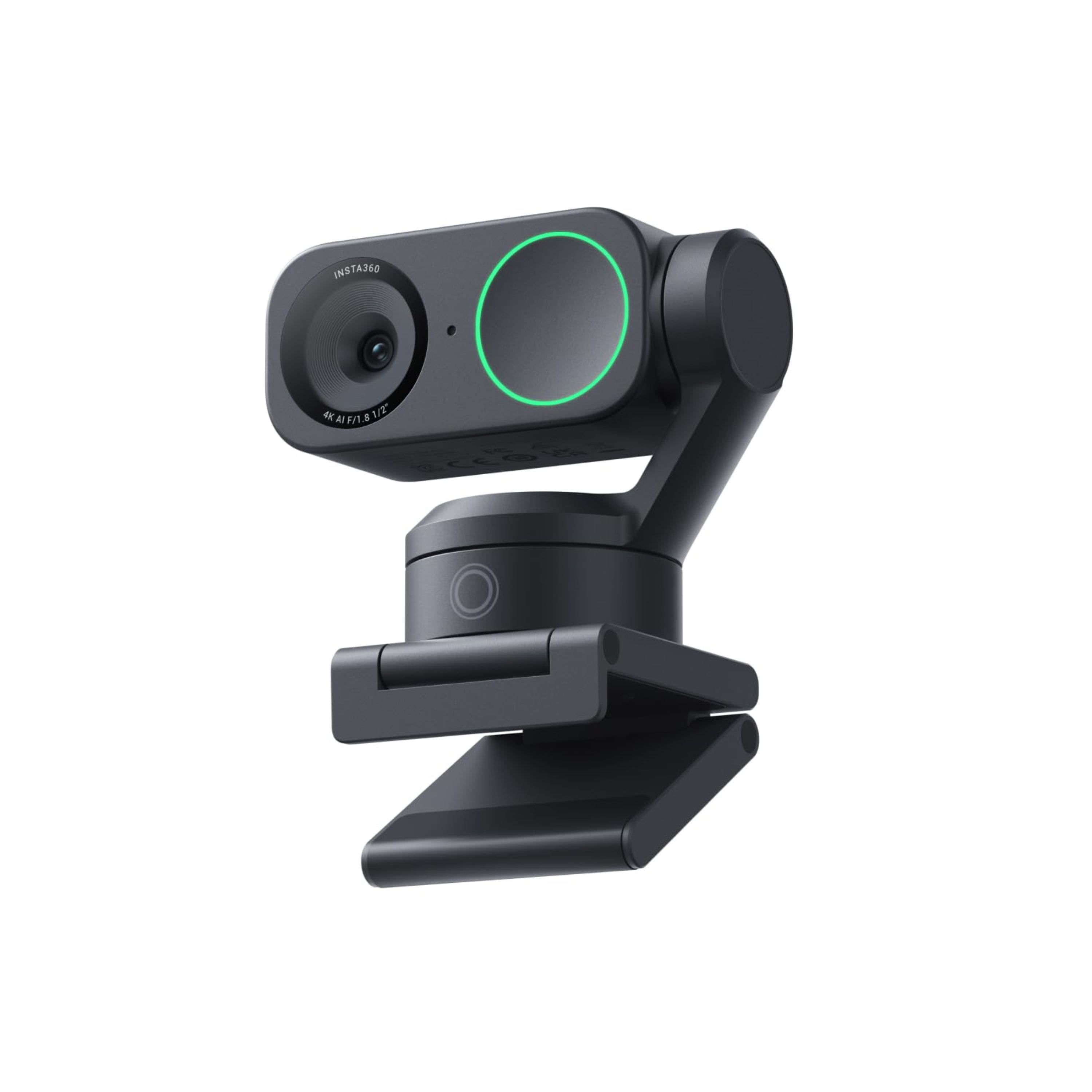
Unboxing the Link 2C, the first thing you notice is the substantial weight and premium materials. This doesn’t feel like the plastic-fantastic webcams crowding the market—it has heft that suggests durability. The mounting clip provides exceptional grip without damaging monitor bezels, a detail I appreciated during testing on everything from thin gaming monitors to thick iMac displays.
The compact form factor disappears nicely when mounted, which matters more than you might think. Many “premium” webcams become distracting visual elements on your desk, but the Link 2C maintains a low profile. The hinge mechanism feels robust enough for daily adjustments, though I did notice it requires slightly more force to reposition than cheaper models—a trade-off for stability.
Performance in Real Use
Where the Link 2C truly separates itself is in actual usage scenarios. The auto-framing isn’t just a gimmick—it’s genuinely useful technology that changes how you interact on camera.
During a product demonstration where I needed to move between my desk and a whiteboard, the camera smoothly tracked my movement and reframed accordingly. Colleagues commented that it felt more like a professionally produced video than a typical conference call. However, I discovered the framing works best with deliberate movements—rapid, erratic motion can sometimes confuse the AI temporarily.
The low-light performance deserves special mention. Compared to my previous Logitech C920s, the Link 2C maintains significantly more detail and color accuracy in dimly lit conditions. That larger sensor makes a tangible difference for evening work sessions or poorly lit home offices.
Ease of Use
Plug-and-play functionality works adequately for basic 1080p streaming, but to unlock the full potential—including the auto-framing and 4K resolution—you’ll need the Insta360 Link Controller software. This creates an interesting usability divide.
For tech-comfortable users, the software adds valuable customization: you can adjust tracking sensitivity, set framing preferences, and even create preset positions. For less technical users, however, this additional step might feel unnecessarily complicated compared to webcams that work fully out-of-the-box.
I encountered one specific scenario worth noting: when switching between conferencing applications, the camera settings occasionally reset, requiring a quick software relaunch. This happened infrequently but represents the kind of real-world friction you won’t find on spec sheets.
Durability & Reliability
After six weeks of daily use, the Link 2C shows no signs of wear—no loose joints, connection issues, or performance degradation. The USB-C connection feels secure, and the cable quality appears above average for this price segment.
Reliability has been generally excellent, with one exception: when used with certain USB hubs, the camera would occasionally disconnect during high-bandwidth usage (4K with AI features active). Direct connection to computer USB ports resolved this completely, suggesting the power demands exceed what some hubs can provide consistently.
Pros & Cons
Pros
- Intelligent auto-framing actually works – Not just marketing hype; genuinely useful for dynamic presentations
- Exceptional low-light performance – Larger sensor provides tangible image quality improvements
- Premium build quality – Feels durable enough for daily professional use
- Versatile mounting options – Works seamlessly with monitors, tripods, or creative setups
- Strong value proposition – Brings high-end features to an accessible price point
Cons
- Software dependency – Requires companion app for advanced features
- Occasional framing delays – Fast, erratic movement can temporarily confuse tracking
- Higher power requirements – May need direct computer connection rather than USB hubs
- Potentially over-engineered – Auto-framing provides little benefit for completely stationary users
Comparison & Alternatives
Understanding where the Link 2C fits in the broader webcam ecosystem requires comparing it to both budget and premium options.
Cheaper Alternative: Logitech C920s
The C920s remains the default recommendation for basic video conferencing needs at around $60-70. Having used both extensively, I can say the choice comes down to movement. If you remain largely stationary during calls, the C920s provides perfectly adequate 1080p video with zero software complexity. The Link 2C only becomes clearly superior when you need its auto-framing capabilities or work frequently in challenging lighting conditions.
Premium Alternative: Insta360 Link (Original)
The original Link costs approximately $100 more and offers primarily incremental improvements: slightly better low-light performance, additional mounting flexibility, and marginally faster tracking. For most users, these differences don’t justify the price jump. The Link 2C captures about 90% of the experience at 60% of the price, making it the smarter choice for all but the most demanding professional users.
Buying Guide / Who Should Buy
Best for Beginners
Surprisingly, the Link 2C works well for beginners who value looking professional without technical complexity. The auto-framing means you don’t need to understand camera angles or composition—the technology handles it for you. The plug-and-play basic functionality gets you started quickly, while the advanced features remain available as you grow more comfortable.
Best for Professionals
Hybrid workers, educators, and content creators will benefit most from the Link 2C’s capabilities. The ability to move naturally during presentations while remaining perfectly framed provides a tangible professional advantage. The consistent image quality across varying lighting conditions also means you maintain professionalism throughout the day without manual adjustments.
Not Recommended For
Stationary users who spend entire calls in the same position gain little from the auto-framing capabilities. Similarly, those needing absolute simplicity might prefer a webcam without software dependencies. If your primary use involves remaining centered in frame with consistent lighting, save your money and opt for a basic 1080p webcam.
FAQ
Does the auto-framing work with multiple people?
Yes, though with limitations. The technology can recognize and frame multiple faces, but works best with 2-3 people. Larger groups may experience occasional reframing as different people become primary subjects. For team meetings, it’s better than single-person webcams but not a replacement for dedicated conference room cameras.
How does it perform with backlit situations?
Surprisingly well compared to similar-priced webcams. The HDR processing does a respectable job balancing exposure, though extremely challenging backlighting (like direct window light) still causes some detail loss in shadows. For typical home office settings, it handles backlighting adequately.
Is the software required for basic use?
No—the webcam functions as a standard UVC device at 1080p without any software. However, to enable 4K resolution, auto-framing, or advanced controls, the Insta360 Link Controller software is necessary. This hybrid approach works well, giving simple users immediate functionality while preserving advanced features for those who want them.
How does it compare to using a smartphone as a webcam?
Smartphone solutions often provide superior sensors but lack the specialized AI framing and consistent reliability. The Link 2C offers a more integrated experience without battery concerns, connection drops, or the need for additional mounting hardware. For dedicated workspace setups, the Link 2C provides better long-term convenience.
Is the Insta360 Link 2C worth the price premium over basic webcams?
Only if you specifically need its auto-framing capabilities or frequently work in variable lighting conditions. For stationary users in consistent lighting, basic webcams provide nearly identical performance at lower prices. The value proposition entirely depends on whether you’ll actually use the intelligent features that differentiate this webcam.